Cloned ESXi Duplicate vmk0 MAC Addresses

August 24, 2012 in vHersey, VITA, VMware

For the ICM class there are 12 different lab environments with 2 virtual ESXi host each. To deploy these ESXi hosts I clone them from a master ESXi template that is preconfigured and has a local datastore with all the necessary class files and software. After I deploy each virtual machine I test connectivity and before last nights class everything seemed fine.

Once the class started accessing the lab environments we started seeing some network issues. Connections to the lab ESXi hosts were being dropped every few seconds, restarting the management networks would bring back connectivity but only for a short time. The issue turned out to be that each of the 24 hosts had the same MAC address assigned to vmk0 – oops!

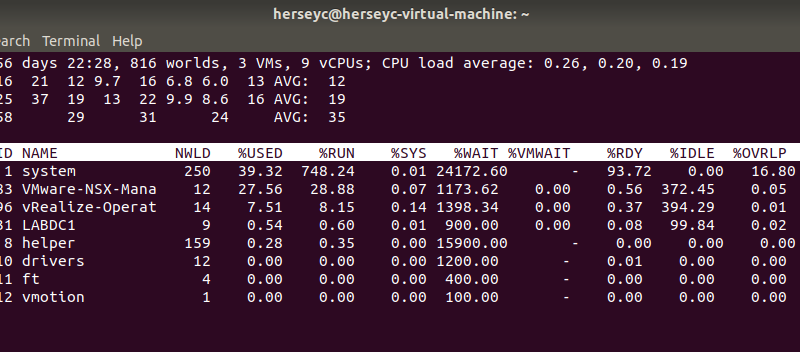
The vmk0 is a virtual interface and a MAC address is generated for it when it is created. When the ESXi template is cloned the vmknic and its configuration (Name, MAC, MTU, and IP settings) are also cloned. Accessing ESXi Shell and running esxcfg-vmknic -l will list the configured vmknics and the configurations (including the MAC) of each:

There are 2 ways to correct this in the cloned ESXi hosts. One way is to delete and recreate the vmk interface. The other is to set the vmknics to use the hardware MAC address of their physical uplink NIC. The process for both of these options can be found in this kb article.

For the lab environment I set the vmknic MAC to follow the hardware MAC.

esxcfg-advcfg -s 1 /Net/FollowHardwareMac

After setting this and rebooting the vmknic (vmk0) now uses the MAC address of its physical uplink nic.

Not sure why this issue did not show up during testing but it should be fixed now.

What should I study for the VCP?

June 5, 2012 in VITA, VMware

Students of the Virtualization Program at TCC frequently ask for resources or tips on how to prepare for the VMware Certified Professional exam so I decided to put together a quick post. There are a lot of great resources out there and these are just a few suggestions I have to help get people on the path to obtaining their VCP.

- Take the Class
Take the VMware vSphere 5 Install Configure and Manage (ICM) class. Not only does the ICM class fulfill the training requirement needed in order to become a VCP, it is an excellent hands-on lab class that will give you some good experience with ESXi, vCenter, DRS, HA, VUM, and other VMware technologies. Many of the VCP blue print objectives are covered by the ICM class.

If you are interested in taking the course check out the VMware IT Academy Program. There may be a community college or technical school in your area that offers VMware training. TCC will be offering the course again in the Fall 2012 (ITN 254). You can also take the course directly from VMware. Remember an approved VMware class that is on the VCP certification path is REQUIRED before you can obtain your VCP.

- Build a Home Workstation Lab
In my opinion the VCP5 exam requires more “hands-on” knowledge than the VCP4 exam did so you are going to want to set up some sort of practice lab to work through the blue print objectives. If you have the resources to set up a supported hardware or even a “white box” lab then that is probably the way to go, but all of the VCP5 blue print objectives can be practiced in a VMware Workstation lab installed on a desktop or laptop.

Get a copy of VMware Workstation 8 and set up a home lab to practice on. There are a lot of resource out there on getting this set up. I did a write up a while ago here: http://www.vhersey.com/2011/12/my-home-vmware-lab/.

Download AutoLab – http://professionalvmware.com/2012/05/vsphere-5-autolab/ This is a set of VM templates and instructions you can use to set up everything need for functioning Workstation Lab.

If you are a TCC student that has taken the class and wants some time in the lab, you know how to get a hold of me – just drop me a note and we can work out some time for you to practice in the lab.

- Online Study Resources
There are A LOT of VCP5 study resources out there but here are a few that I think are definitely worth checking out.

The VMware VCP Certification page is probably the best place to start. Here you will find the certification paths and requirements, the VCP5 exam blue print, and a VCP5 practice exam. If you don’t already have a MyLearn account you have to set one up to access these resources, this only takes a minute and doesn’t cost you anything.

There are a number of #vBrownBag recordings covering objectives on the VCP5 blue print here: http://professionalvmware.com/brownbags/

This is an excellent study guide based directly on the VCP5 blue print http://www.virtuallanger.com/vcp5/ They have taken the time to put all the study notes together in a single PDF organized by blue print objectives. Go there – Download it!

Here are my notes I put together when I was preparing for the exam http://www.vhersey.com/vcp5-study/

- Read Scott Lowe’s Book
Pick up a copy of Scott Lowe’s book Mastering VMware vSphere 5. This is an excellent exam study resource for both the VCP and VCAP-DCA.

- Practice Tests
There are a few very good practice exams on the web but I think Simon Long’s is probably one of the best and you can find it here http://www.simonlong.co.uk/blog/vcp5-practice-exams/.

There is also a practice exam available at VMware MyLearn – http://mylearn.vmware.com/mgrReg/plan.cfm?plan=12457&ui=www_cert (MyLearn Login Required)

- Stay away from the dumps!
Besides the fact they are inaccurate and can get you into trouble if you think you can just memorize the questions and answers, they also decrease the value of the certification.

Help preserve the integrity of the exam and the value of the certification. Stay away from dumps! Study the blue print, learn the product, and get the pass based on your knowledge of the technologies.

- Study and Practice – Good Luck!
This information should get you well on the way to obtaining your VCP.

Take the class, study the blue print, and get some hands-on experience (even if just in a lab).

The VMware community is awesome. If you have questions or need help check out the VMware Communities and the various social media sites, there are lots of great people out there willing to help.

Anyone that has a VCP5 resource they would like to share feel free to add it to the comment. Thanks!

GOOD LUCK!

Busy, Busy, Busy… but it’s a good thing.

March 30, 2012 in vHersey, VITA, VMware

Been a very busy week. Just a lot of stuff going on with work, class, and school. Besides working and teaching the VMware IT Academy classes at TCC I am also taking several classes. With just a few weeks left in this semester things are starting to wrap up, but it is the final push before the finish with papers due and finals before we know it.

Updated the TCC lab environment to 5.0 Update 1 last weekend without issue. I am planning to update my work production environment next week. Update is pretty straight forward. Just update vCenter, update VUM, then use VUM to update the hosts.

Lots of other projects and task keeping me busy at work. Email filter migration tonight, an employee review that I need to wrap up, transitioning to our new lending system, branch equipment refreshes, a VDI proof of concept on the horizon, and a ton of other interesting projects. It’s all good but again it is keeping me pretty busy. I had to take this AM off just to have time to write a quick blog post.

On top of work and school I started browsing through a couple of new books.

I picked up a copy of Cody Bunch’s Automating vSphere: With VMware vCenter Orchestrator. I have not done much with vCenter Orchestrator beyond installing, configuring, and checking out some of the provided workflows. I have only browsed the first few pages of Cody’s book but I am looking forward to reading more and discovering how I may be able to use vCenter Orchestrator to improve the way I manage both the TCC lab environment and my production work environment.

I also received an instructors review copy of the book Administering vSphere 5. Again I have only had a chance to flip through the book but it looks to have some good info in there. Hopefully I will have time in the near future to review it in depth.

Pretty great VMware Troubleshooting class this past Thursday. We covered network troubleshooting focusing on Distributed Virtual Switches and PVLANs. I actually had a student tell me that he had read Scott Lowe’s Mastering VMware vSphere 5 book and I did a much better job explaining PVLANs. Not sure I would agree, Scott’s book is awesome and I recommend it to everyone that takes the class. True or not it was good to hear :)

Have to be at a branch for a bit tomorrow to unhook things for carpet installers but after that I am looking forward to at least a few hours of down time. Have a great weekend!

Why not make all seven physical uplinks active? Allocating resources in a virtual environment.

February 24, 2012 in vHersey, VITA, VMware

I am currently teaching a VMware Manage for Performance class at TCC. During this week’s class we had a great discussion (OK there was a little bit of soap box preaching involved also) on resource allocation in a virtual environment. The discussion started from a question that was asked based on the resolution to a network performance lab scenario.

In the lab a standard vSwitch with seven 1GB physical uplinks had eight VMs attached to it. In the scenario a VM attached to the vSwitch had network throughput that was maxing out at 200MB. A series of performance graphs were provided and from the graphs you could see that only one of the seven physical uplinks (vmnic3) was passing network traffic. The issue was that all the other physical uplinks were in standby and vmnic3 was the only active uplink passing network traffic for all VMs attached to the vSwitch. The solution was to make four of the remaining physical uplinks active and enable load balancing. This left two uplinks in standby to be used in the event of a failure.

This raised the question “Why not make all seven physical uplinks active?”

Read the rest of this entry →