Citrix XenServer, meh. Console Access, neat!

April 7, 2013 in Citrix, vHersey, VMware

Recently I have performed some discovery and analysis on a couple of production Citrix XenServer environments. Both of them hosting Citrix XenDesktop and both of them have been running beside a VMware vSphere environment. Not sure exactly why the design decision was made to introduce a separate hypervisor to an environment when XenDesktop is fully supported on VMware but what is done is done.

One of these environments is going through a network redesign and I am helping out with that. The network changes are going to require that some changes be made to the network configurations on the XenServers and this is what I was asked to help out with. I have had minimal exposure to XenServer and it was back a few years ago so I needed a quick refresh. I spun up XenServer in the lab for some quick testing.

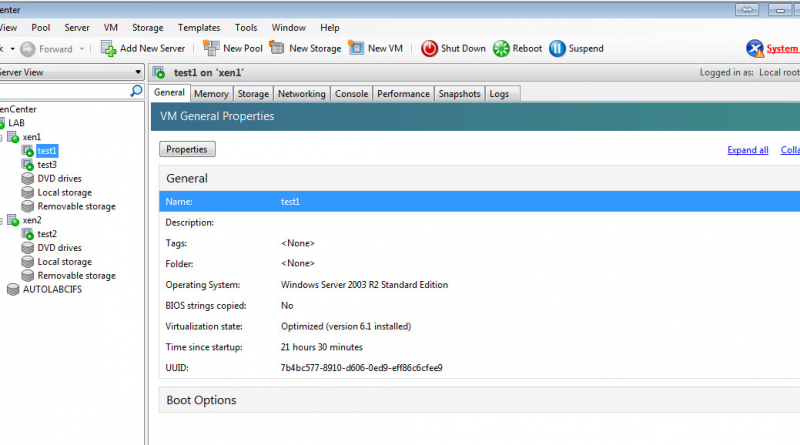
XenCenter-ScreenShot

Good news is the changes that need to be made are fairly simple and things should go without issue. Bad news is all VMs without XenServer Tools installed (a majority of them) will have to be powered down before the network connection can be changed. What!!! Powered down to disconnect a VM from one network and reconnect it to a different one, yep. Crap!

One feature of XenCenter that I do find extremely neat (and useful) is the host Console access through XenCenter. Just select the host and then the Console Tab and you are presented with a command line console for the select XenServer host.

XenCenter-CLIConsole

To start up the console GUI (similar to DCUI on ESXi) run xsconsole from the command line.

XenCenter-GUIConsole

XenServer was easy to install and XenCenter management is fairly intuitive. The host console access is a neat feature but overall I am not impressed (now I know why I stopped messing with this way back when). I am going to keep poking around in it just so I can be familiar with the ins and outs but as I tweeted yesterday – “XenServer installed in the home lab. So I tried it and it is OK, now give me back my vSphere.”

BTW my lab XenServer environment is running on ESXi. To do this you prepare and configure the VM just as you would to run nested ESXi (VM HW version 9, vhv.enabled = “TRUE”, and Guest OS: VMware ESXi 5.x).

XenonESXi

I <3 vSphere!

Citrix Certified Advanced Administrator (CCAA) for XenApp 6

February 19, 2013 in Citrix, vHersey

CCAA

 
On February 18, 2013 I sat for and passed the Citrix Exam 1Y0-A22 Citrix XenApp 6.5 Advanced Administration exam which means I now hold the Citrix CCAA. The path to obtaining the CCAA requires that you obtain the Citrix Certified Administrator (CCA) for Citrix XenApp 6. I sat and passed that exam on January 22, 2013. I have also sat for and passed the exam to become a Citrix Certified Administrator (CCA) for Citrix XenDesktop 5.

The preparation guide for the Basic Administration Exam (1y0-A20) can be found here http://training.citrix.com/mod/ctxmodviewer/view.php?mod=resource&id=254 and the preparation guide for the Advanced Administration Exam (1y0-A22) can be found here http://training.citrix.com/pluginfile.php/41625/mod_resource/content/1/A22_preparation_guide.pdf. Both of these guides outline the test and the objectives of the test.

In my opinion if you properly prepare for the XenApp CCA Exam then you will also be prepared for the XenApp CCAA Exam. You may notice there was not a lot of time between my XenApp CCA and my XenApp CCAA exams. This is because after looking over the exam objectives I realized I had already covered most things while preparing for the CCA.

The only thing I found “advanced” about the CCAA exam were the simulation questions. Not sure if it was my preparation or what but both exams, especially the advanced exam, just seemed too easy. My take away from the exams was feeling that I had not really been tested.

Now with that said, I have to say I did not score very well on the simulations. Of course I cannot discuss specifics but I feel that I accomplished all tasks in the simulations and I feel I accomplished them correctly – not sure exactly how they are scored but my score was low. Not sure about the scoring process but I really thought I had done better. One thing I was very surprised about was how little the simulations counted toward the overall score. I would have expected these simulations to be worth more on an advanced exam but the low score on the sims appeared to have very little impact on my overall score.

Besides the prep guides here are a few other key resources I used to study. The study guides at Citrixxperience.com are fantastic. I also used the Citrixxperience XenApp CCA practice test to help prepare. The Citrix Documentation (Citrix eDocs) along with the Citrix Knowledge Center articles referenced in the preparation guides are also excellent. As part of my studying I also deployed a XenApp and XenDesktop environment in my home lab. (AutoLab is AWESOME!!!) There will probably be another post soon about how I set up my Citrix study lab.

A few folks have asked me about how these exams compare with VMware exams. I have not taken any VMware desktop exams but I can tell you that compared to the Datacenter VCP exam the CCA was more like a pop quiz. To compare the CCAA to the VCAP-DCA exam – well take the same pop quiz and compare it to a final exam. There really is no comparison. When I completed the VCP exam and to a much greater extent the VCAP exams I really felt like my knowledge had been tested and I had accomplished something.

I did a lot of preparation for the Citrix exams and I learned a lot but the exams left me kind of feeling “was that it?” With the preparation I did I feel that I will have no problems deploying or troubleshooting a XenApp environment. As far as it goes, since I probably would have not dedicated the time to it, I guess the exam did facilitate a means to an end (or a beginning) and was not a complete waste of time.

I am looking forward to some XenApp and XenDesktop deployments where I can put some of this knowledge to work.

VMware vSphere Client on the iPad Using Citrix XenApp

May 23, 2011 in Citrix, iPad Apps, VMware

I published the vSphere Client using Citrix XenApp to make it available to administrators on any machine they happened to log into on our network.  There have been multiple occasions where I have been at a branch location and needed to access the vSphere client.  Usually I just RDP to my desktop and access it from there, but since every machine in our environment is already set up to launch XenApp published apps I figured why not publish the vSphere client.

The vSphere Client is delivered like any other application.  Just install the client on one (or more) of  the XenApp Application Servers in your farm and then publish it as an “Accessed from a server” application from the Citrix Services Delivery Console. You can also install any plugins you want delivered with the client and they will be available.

Once the vSphere Client is published it will also be available using the Citrix Receiver app on an iPad. Just tap the icon in Citrix Receiver and the VMware vSphere Client login opens.  Since you are logging into the XenApp server Windows Session Credentials can be used.

Read the rest of this entry →

Need Help!!! XenApp Streaming Profile for EMC ApplicationXtender Desktop 6.5

May 20, 2011 in Citrix

For the past week or so I have been trying to create a working Citrix XenApp streaming application profile for EMC’s ApplicationXtender Desktop 6.5 Document Manager and the Data Source Selector that goes with it.

The streaming profile is created using a newly cloned Windows XP SP3 VM joined to our domain with the latest and greatest updates applied with Citrix Streaming Profiler Version 6.0.2.14

When running the New Profile Wizard and installing the application all seems well. I am able to run the Data Source Selector application to set up the data source and then run the Document Manager to test access during profile creation. The new profile is built, saved to a network share, and published as a “Streamed to client” application type from the Delivery Service Console.

When I try running the streamed app I receive this error:

This application has failed to start because the application configuration is incorrect. Reinstalling the application may fix the problem.

%#$*!

An error is also generated in the Windows Application log:

Source: Citrix offline plug-in
Event ID: 4112
Description: Launch of application c:\program files\xtendersolutions\content management\aexdsselector.exe failed. Trying ICA fallback……

No real help in the logs.

I have created and deployed a number of other streaming application profiles that are working without issue, this one just has me stumped. I have been searching for a solution on Google, on the Citrix support forums, and on EMC Powerlink without success.

Being able to deliver this as a streaming app is key piece of a project we are working on. If anyone out there has any help, hints, or ideas they will be much appreciated.

Thanks in advance…