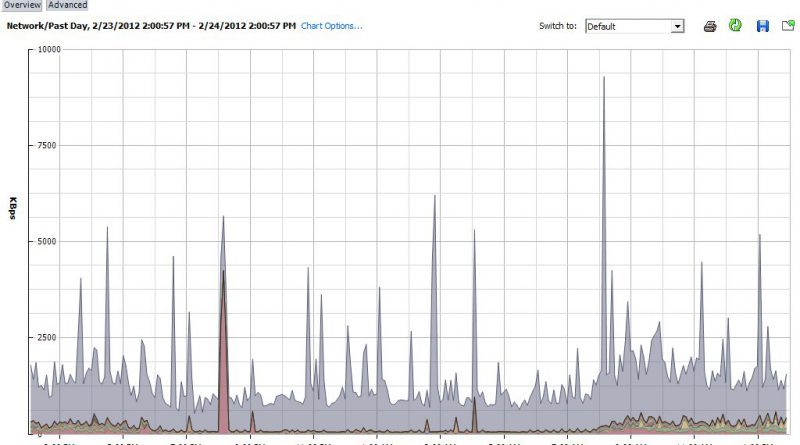
Why not make all seven physical uplinks active? Allocating resources in a virtual environment.

February 24, 2012 in vHersey, VITA, VMware

I am currently teaching a VMware Manage for Performance class at TCC. During this week’s class we had a great discussion (OK there was a little bit of soap box preaching involved also) on resource allocation in a virtual environment. The discussion started from a question that was asked based on the resolution to a network performance lab scenario.

In the lab a standard vSwitch with seven 1GB physical uplinks had eight VMs attached to it. In the scenario a VM attached to the vSwitch had network throughput that was maxing out at 200MB. A series of performance graphs were provided and from the graphs you could see that only one of the seven physical uplinks (vmnic3) was passing network traffic. The issue was that all the other physical uplinks were in standby and vmnic3 was the only active uplink passing network traffic for all VMs attached to the vSwitch. The solution was to make four of the remaining physical uplinks active and enable load balancing. This left two uplinks in standby to be used in the event of a failure.

This raised the question “Why not make all seven physical uplinks active?”

Read the rest of this entry →

Creating a Scheduled Tasks to Change VM Resource Settings

September 28, 2011 in DCA, VMware

Let’s say there is a VM, or a Resource Pool with several VMs, that most of the time just sits idle. Every Sunday an application runs on this VM (or on VMs in the Resource Pool) to do some data analysis and generates reports, the process usually takes 2-4 hours. During this this time you want to be able to reserve some CPU and/or memory resources so the VM (or Pool) can complete the process and then you want to be able to return the resources to the environment.

This can be easily automated by creating Scheduled Tasks to add and remove VM resources.

Just open Scheduled Tasks pane from the vSphere Client Home screen and click the icon to add a new tasks.

Read the rest of this entry →